
The Website Guide for Professionals
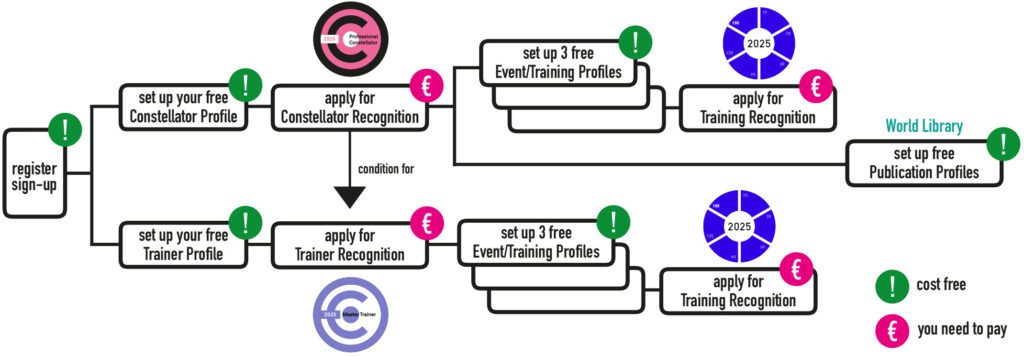
If you are a Constellator and a Constellation Trainer and want to use our website and access all of its features, you will need to register.
You can find the sign-up button in the top right corner of your screen.
1. Setting up your Constellator and Trainer Profiles
Please note
• Setting up your Constellator and Trainer Profile is free of charge
1.1 Setting up your Constellator Profile
1.1.1. Under your profile icon in the top right corner, you will find a drop-down menu
1.1.2. Click on Profile
1.1.3. In the left-hand navigation column, select Constellator Profile
1.1.4. On the right side, click the green Edit button
1.1.5. You can now enter your information as a Constellator
1.1.6. At the bottom of the form, please agree to our terms of service,
privacy policy, and publication guidelines
1.1.7. Finally, publish your Constellator Profile.
1.2 Setting up your Trainer Profile
1.2.1. Underneath your profile icon in the top right corner, you will find a drop-down menu
1.2.2. Click on Profile
1.2.3. In the left-hand navigation column, select Trainer Profile
1.2.4. On the right side, click the green Edit button
1.2.5. You can now enter your information as a Trainer
1.2.6. At the bottom of the form, please agree to our terms of service,
privacy policy, and publication guidelines
1.2.7. Finally, publish your Trainer Profile.
______________________________________________________________________
2. Applying for Constellator and Trainer Recognition
2.1 Apply for International Recognition as a Constellator
Please note
• You need to pay a review fee for the International Constellator Recognition
• The yearly fee is 150 Euro, including 19% VAT
• We have introduced pricing categories for discounts based on the purchasing power of each country,
following the recommendations of the World Bank
• The discount for your country will be applied automatically, based on your billing address.
• Additionally, you will automatically receive a 50% discount for the first year of Recognition
• You can pay via STRIPE , either with a Credit Card or via PayPal
2.1.1. In the submenu under your profile icon in the top right corner,
click on Apply for Constellator Recognition.
2.1.2. Please read the short explanation texts
2.1.3. Then open the three areas of the questionnaire one after the other and answer the questions
2.1.3.a) Your Professional qualification
2.1.3.b) Your Experience
2.1.3.c) Your Contribution to the Field
2.1.4. Once you have answered all questions, you will be informed about the level
of Recognition you have reached so far.
2.1.5. If you want to apply, please go to Apply now for Recognition (pay now)
2.1.6. You will be directed to STRIPE
2.1.7. In the blue field, you will see the expected review fee you will have to pay for the current year.
2.1.8. Send everything to us (follow the process)
2.1.9. We will review your questionnaire and verify that all necessary documents have been provided.
2.1.10. We will award you with the International Recognition (for a Constellator)
2.1.11. We will upload the questionnaire to your profile and publish your International Recognition Batch
2.1.12. We will send you your certificate for the current year
2.1.13. After that, you can actualize your questionnaire at any time
2.1.14. At the beginning of each new year, the actualized versions will be published after our approval
2.2 Apply for International Recognition as a Trainer
Please note
• You can only apply for International Recognition as a Trainer
if you already hold International Recognition as a Constellator
• You will also need to create your Trainer Profile
before you can begin the application for Trainer Recognition
• You need to pay a review fee for the International Trainer Recognition
• The yearly fee is 100 Euro, including 19% VAT
• We have introduced pricing categories for discounts based on the purchasing power of each country,
following the recommendations of the World Bank
• You can pay via STRIPE, either with a Credit Card or via PayPal
2.2.1. In the submenu under your profile icon in the top right corner,
click on Apply for Trainer Recognition
2.2.2. Please read the short explanation texts
2.2.3. Open the three areas of the questionnaire one after the other and answer the questions
2.2.3.a) Your Professional qualification
2.2.3.b) Your Experience
2.2.3.c) Your Contribution to the Training Field
2.2.4. Once you have answered all questions, you will be informed about the level
of Recognition, you have reached so far
2.2.5. If you want to apply, please go to Apply now for Recognition (pay now)
2.2.6. You will be directed to STRIPE
2.2.7. In the blue field, you will see the expected review fee you will have to pay for the current year
2.2.8. Send everything to us (follow the process)
2.2.9. We will review your questionnaire and verify that all necessary documents have been provided
2.2.10. We will award you with the International Recognition (for a Trainer)
2.2.11. We will upload the questionnaire to your profile and publish your International Recognition Batch
2.2.12. We will send you your certificate for the current year
2.2.13. After that, you can actualize your questionnaire at any time
2.2.14. At the beginning of each new year, the actualized versions will be published after our approval
______________________________________________________________________
3. Setting up Event and Training Profiles
Please note
• You can create Event and Training Profiles only if you hold Constellator Recognition
• Each further Recognition entitles you to three free Event and Training profiles
• Because a training is also an event, you will sometimes see only the term event
3.1. In the submenu under your profile icon in the top right corner, click on My Events
3.2. Select Create New Event or Training
3.3. Fill in the form and Save the Event
3.4. You can add changes at any time – click on My Events and choose the one you want to work on
______________________________________________________________________
4. Applying for International Recognition for your Training
Please note
• You need a Training Profile to apply for International Recognition for your Training
• You need to pay a review fee for the International Training Recognition
• The fee is 40 euros, including 19% VAT, and it is valid for a period of 18 months
• We have introduced pricing categories for discounts based on purchasing power
of each country, following the recommendations of the World Bank
• You can pay via STRIPE, either with a Credit Card or via PayPal
4.1. In the submenu under your profile icon in the top right corner, click on My Events
4.2. Select your training and select Apply for Recognition
4.3. Open the three areas of the questionnaire one after the other and answer the questions
4.3.a) Professional qualification of the training
4.3.b) Experience
4.3.c) Contribution to the Training Field
4.4. Once you have answered all questions, you will be informed about the level
of Recognition, you have reached so far
4.5. If you want to apply, please go to Apply now for Recognition (pay now)
4.6. You will be directed to STRIPE
4.7. In the blue field, you will see the expected review fee you will have to pay
for a period of 18 months
4.8. Send everything to us (follow the process)
4.9. We will review your questionnaire and verify that all necessary documents have been provided
4.10. We will award you with the International Recognition (for your Training)
4.11. We will upload the questionnaire to your Training Profile
and publish your International Recognition Batch
4.12. After that, you cannot change the Training questionnaire
4.13. If it is a recurring Training, please duplicate the Training Profile and actualize it
for the following Recognition
______________________________________________________________________
5. Setting up your Publication Profile
We are building the world’s largest library of systemic constellation literature — a place where knowledge, experience, and inspiration come together for our global community. If you have published books or articles in this field, we warmly invite you to create your publication profile and contribute to this shared resource. Our World Library will be fully searchable, making your work visible and accessible to colleagues around the globe.
Please note
• You need a Constellator Profile to set up a Publication Profile
• The basic publication profile is free of charge.
• The extended publication profile (with more information and a buy option) is free until 12.2027.
• After that, it will cost between 10 and 40 euros per year.
5.1. In the submenu under your profile icon in the top right corner,
click on My Publications (World Library)
5.2. On the site My Publications, select Create new Publication
5.3. Fill in all information and publish
______________________________________________________________________
6. Cancel your subscription
If you wish to cancel your subscription for the International Recognition review fees for Constellators and/or Trainers, please log in to the Stripe account you created when you first started your subscription.
______________________________________________________________________
7. Deleting your Account
If you want to delete your CI Account incl. all profiles and subscriptions, please follow these steps
• Open the drop-down menu under your profile pic in the top right corner of your screen
• Go to Account
• In Account, please go to Notification Settings
• In Notification Settings, please click on Delete Account
• Please carefully read our explanations and follow the process